CereLox
# CereLoX
AI-Powered Central Intelligence for logs
A modern, secure, on-device Windows log analysis tool built for students and beginners.




Introduction
CereLoX is a user-friendly log analysis tool designed for everyone. Its mission is to provide security insights and peace of mind by making high-grade log analysis simple, without requiring technical expertise.
The core of CereLoX is its on-device security model. Unlike other services that require you to upload your sensitive system logs to the cloud, all analysis happens locally on your computer. Your files are never transmitted, never stored, and never seen by us. You hold the keys, you hold the data, and you have total control.
✨ Key Features
- 🤖 AI-Powered Explanations: Integrated with the Gemini API to provide simple explanations of complex security concepts and summarize your specific log data.
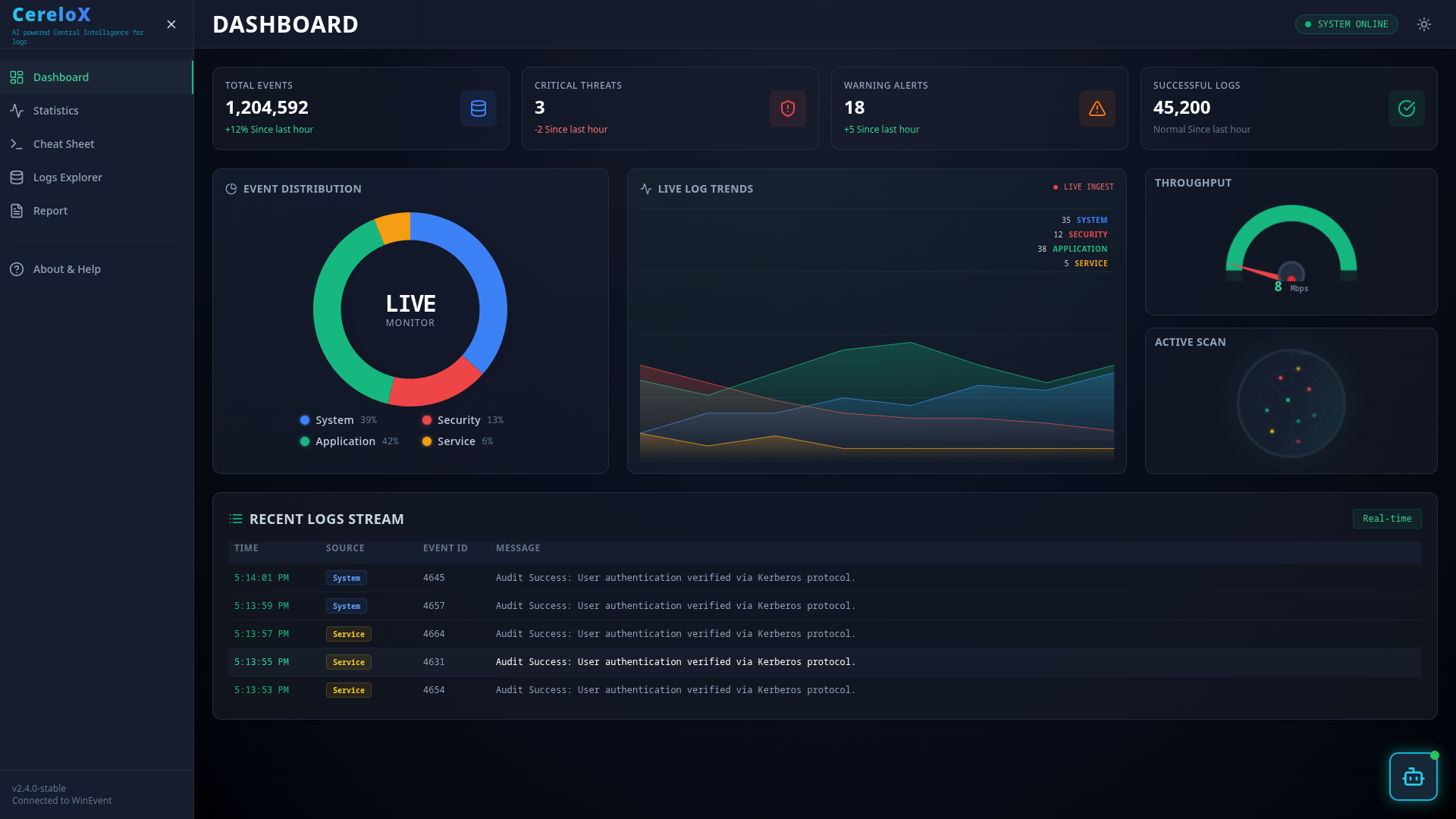
- 📈 Live Dashboard: Utilizes Chart.js to display a live, auto-updating dashboard of event trends, errors, and critical security alerts.
- 💻 On-Device Security: All operations are performed client-side. Your sensitive Windows logs never leave your computer, ensuring absolute privacy.
- ⚙️ Automated Log Fetching: Automatically fetches and parses Security, System, and Application logs from the Windows Event Viewer in real-time.
- 📄 Professional Reports: Generate and download comprehensive reports of your system’s activity in PDF, CSV, or JSON formats.
- 📦 Simple
.exeInstaller: Packaged as a single executable file using PyInstaller. No complex setup or dependencies needed. - 💡 Light & Dark Mode: A sleek, modern UI with a theme toggle that respects your system preferences.
Technology Stack
Frontend:




Backend & Database:





AI & Version Control:


├── LICENSE
├── my-cyber-dashboard
│   ├── cerelox_logs.db
│   ├── CyberChatbot.jsx
│   ├── eslint.config.js
│   ├── index.html
│   ├── package.json
│   ├── package-lock.json
│   ├── postcss.config.js
│   ├── public
│   │   └── vite.svg
│   ├── README.md
│   ├── server-main.py
│   ├── server.py
│   ├── src
│   │   ├── App.css
│   │   ├── Appinitial.jsx
│   │   ├── App.jsx
│   │   ├── App- see Later.jsx
│   │   ├── assets
│   │   │   └── react.svg
│   │   ├── index.css
│   │   └── main.jsx
│   ├── tailwind.config.js
│   └── vite.config.js
└── README.md
🚀 How it works
Follow these steps to set up the backend server and frontend dashboard from source.
1. Installation
Clone the repository and install the necessary dependencies for both layers.
# Clone the repository
git clone [https://github.com/ismailali025/CereLox.git](https://github.com/ismailali025/CereLox.git)
cd CereLox/my-cyber-dashboard

# Install Frontend dependencies
npm install

# Install Backend dependencies
pip install flask flask-cors google-generativeai pywin32
2. Configuration AI Feautures (Optional)🔑
Open server.py file in your preferred code editor. and add your Google Gemini API key to enable the AI Chatbot features. (If skipped, the dashboard will still function but the AI Chatbot will be disabled).
GEMINI_API_KEY=your_actual_api_key_here
3. Running the Application ⚡
You must run the backend and frontend simultaneously in two separate terminals.
Terminal 1 (Backend):
python server.py
Initializes the Flask server on http://localhost:5000 to parse Windows Event Logs.
Terminal 2 (Frontend):
npm run dev
Starts the Vite development server. Open the local URL (typically http://localhost:5173) in your browser.
Author
Team SaEcho
- Email:
infa.khadershareef@gmail.com - GitHub:
[github.com/KHADERSHAREEF19] - LinkedIn:
[linkedin.com/in/KHADER SHAREEF MADANI]
License
This project is distributed under the MIT License. See LICENSE for more information.
Acknowledgements
- Flask for the powerful and simple micro-backend.
- Google Gemini for the AI integration.
- Chart.js for the beautiful and responsive charts.
- PyInstaller for the hassle-free
.exepackaging. - ReportLab for the PDF report generation.